
Samsung Bespoke Jet Bot Combo AI: Brush stuck (voice: remove the brush)
Where to look: Main brush underside.
Voice guide: remove the brush and take out whatever is stuck.
Picture
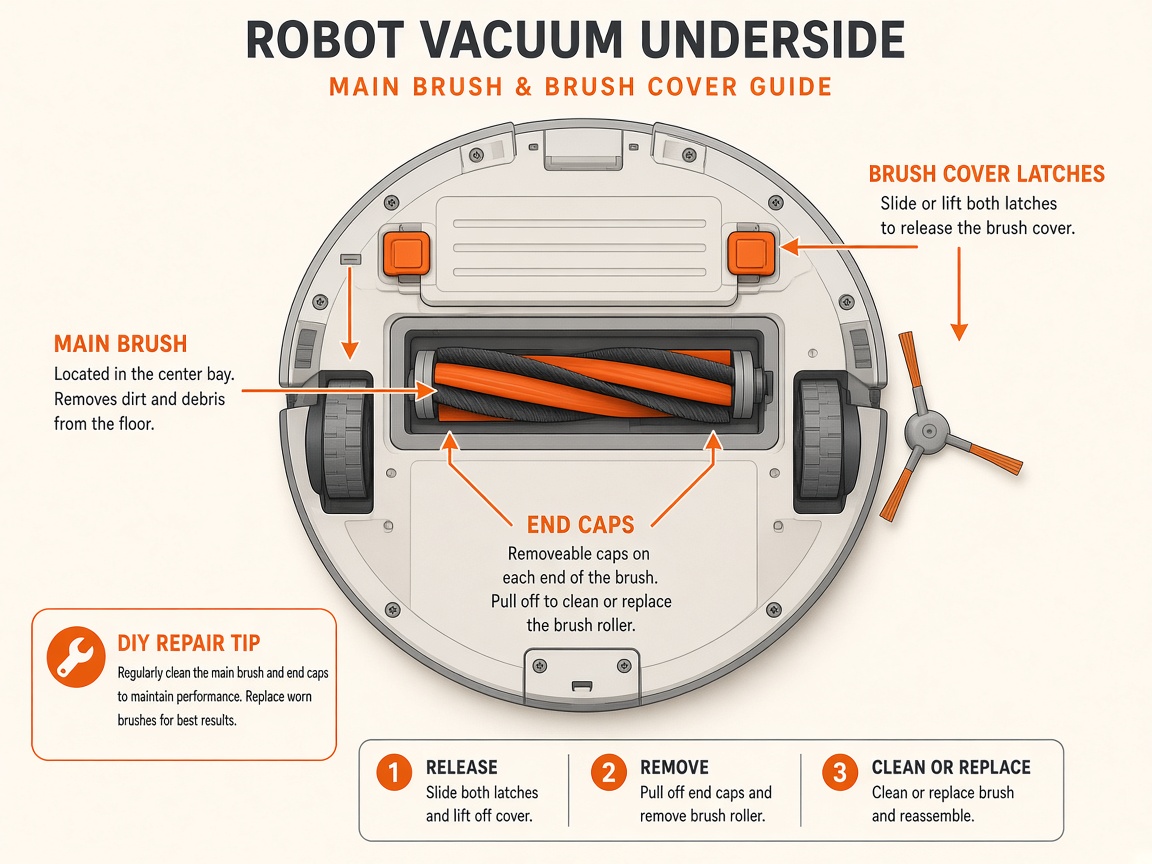
What you might notice
- Brush stuck voice alert
- Weak suction / noise
Can I DIY this?
Easy DIY (~10-20 min) on Samsung Bespoke Jet Bot Combo AI. Clear debris first; replace a worn brush/filter only if cleaning fails. If the same alert comes back after a clean install, book a Brisbane meetup.
What you need
- Soft cloth
Do this
- Set Power saving / Sleep mode.
- Remove the brush and clear foreign matter. Also check the side/spin brush if prompted.
- Empty the dustbin if suction is weak or noise suddenly increases.
- If the alert returns, request repair.
Parts (only if cleaning fails)
- None for a basic clean
Official references
- https://www.samsung.com/ae/support/home-appliances/samsung-jet-bot-combo-troubleshooting/
- https://www.samsung.com/us/support/troubleshoot/TSG10002342/
- https://images.webfronts.com/cache/frjzskjdarum.pdf
Still stuck?
Parts for this fix
Prefer buying the part and DIY when safe — round-trip postage often rivals a new machine. Ship docks only if we ask.
- Main brush rollerSearch Amazon AU →
- Side brushSearch Amazon AU →
As an Amazon Associate, BotRescue may earn from qualifying purchases. Prices and stock are on Amazon AU. · campaign guide-samsung-bespoke-jet-bot-combo-ai